


Features & Benefits
This smart all-in-one A3 inkjet Brother MFC-J6530DW printer provides a speedy first page out time, as well as flatbed A3 scanning and a 50-page Automatic Document Feeder (ADF) to take all the hussle out from your workload. Ideal for cost-savvy businesses, this inkjet is compatible with high-yield Brother MFC-J6530DW ink cartridges that print up to 3,000 pages. High capacity Brother MFC-J6530DW ink cartridges will help to bring cost per page down. Along with it, this printer combines with robust construction and intelligent connectivity, making it a must buy for any small business or home office.
What you will love more about this printer is its new build design. This design delivers a more robust and easy to operate device which will suit a busy work environment. This comes with a new and improved print head, increasing machine life and ensuring exceptional durability. What more, Now you do not have to worry about the paper capacity, it comes with a 250-sheet capacity paper tray and a rear manual feed slot for printing on a wide range of media. Besides you can enjoy fast and hassle free scanning of multi-paged documents with the 50 sheet Automatic Document Feeder. This printer allows you to reduce print costs, time and paper usage with automatic 2-sided printing technology.
You get to show off your sharp black text and vivid colour prints with new pigment based ink. The 4 individual Brother MFC-J6530DW ink cartridges will save time and money as you can have optional high yield cartridges that deliver yields up to 3,000 mono and 1,500 colour pages, as well as standard capacity cartridges according to your choice. Using this printer, connecting to your smartphone, tablet, laptop and desktop is easy. Also, using wireless and Wi-Fi Direct you don’t need a router to connect to your printer. The list of features does not end here, as you can also scan to popular cloud storage devices directly using the large 6.8cm intuitive swipe touchscreen. Also, you get to capture and convert documents with ease with the exclusive Brother Cloud Apps.
Expert Verdict
One of the recent trends in inkjet all-in-one printer design is larger and A3 printers. Brother printer has been one of the most loved printers with many of its business inkjets offering at least occasional, single-sheet A3. The MFC-J6530DW is a full A3 design, including the main paper tray and automatic document feeder (ADF). Specially designed for the small home offices, the MFC-J6530DW is a big black box with a 50-sheet feeder on top and a pull-out control panel on the front side, including a 68mm touchscreen and fax number pad. Its touchscreen does its job as the printer promises. Also, it provides full control of the printer’s functions, including the capability to download and print files from online services, such as Dropbox, Google Drive etc. Not only this, but you can also scan files directly to the same services.
Under the control panel, there is a single paper tray, having the capacity to take up to 250 sheets of A4 or A3 paper. The paper tray can take the paper down to 15 x 10cm, and hence can be used for photo sheets as well. It also comes with a single-sheet feed at the rear of the printer, so you can handle occasional print jobs without having to reload the tray again and again. Besides, there is a USB socket at the left of the control panel, where you can transfer documents from a USB drive. To the right of the control panel is a flip-down cover providing access to four separate Brother MFC-J6530DW ink cartridges, all the four Brother MFC-J6530DW ink cartridges are easy to use and maintain. Besides, you only need to replace the Brother MFC-J6530DW ink cartridges which run out of ink. The printer can also connect wirelessly via wifi to your device. Moreover, Brother’s apps for Android and iOS are easy to use and quick to detect the machine. It is a disappointment that the MFC-J6530DW lacks NFC technology, which would make this task simpler still. Also, the software package includes the usual drivers and a copy of PaperPort to offer good overall support. The MFC-J6530DW offers USB and 10/100 Ethernet connectivity, along with phone line and handset links. But, all these cables need to be fed through channels in the printer’s internal parts because a machine of this size takes up quite a lot of the cable length.
Brother promises the rates of the MFC-J6530DW at 22 ppm in black and 20 ppm in colour Brother MFC-J6530DW ink cartridges. In testing, the maximum speeds show a difference of at least 10-12 ppm. Though a duplex speed of 12.4ppm in the 20-side sheets was quite impressive. Coming to print quality, print quality can be variable. Black text print is fair, however not as sharp as from printers from Canon and HP. Colour graphics can be insipid as if they’d already been in a window for a week, and some noticeable banding can be displayed in an A3 poster. Photo images on Brother’s own media are bright and sharp, although some detail, such as shadows, can be lost in darker areas. Brother MFC-J6530DW ink cartridges are available in two capacities, but if you can afford the XL Brother MFC-J6530DW ink cartridges, they provide considerably better value and we would recommend the same. The running costs are also good.
Concluding, If you are in search of a machine with full A3 print, scan and copy functions, Brother’s MFC-J6530DW should be on your list. Though it has one or two misses, first its variable graphic print quality and second the lack of a duplex scanner. Still, at a reasonable price, it’s a good general-purpose, wide-format all-in-one machine.
Review
 Small businesses often look for economical all-in-one machines that offer features that can easily manage the workload. Brother MFC-J6530DW is one such inkjet all-in-one that can prove to be a smart printing assistant both in business and home office environments.
Beginning with its weight of 19.6 kg, it is quite a heavy machine. Even the dimensions of 575(W) x 477(D) x 305(H)mm add to a large footprint. The most salient feature of this device is its A3 printing design both for the main paper tray and ADF which can manage 250 and 50 sheets respectively. In fact, you can print, copy, scan and fax with A3 size sheets. Navigation has been made simpler with a 6.8 cm colour touchscreen LCD. Printing for documents is supported with speed up to 22 ppm for mono and 20 ppm for colour. Different connectivity options like USB and Ethernet for wired and WiFi and WiFi Direct for wireless are supported. Automatic duplexing reduces cost per and page. XL versions of Brother MFC-J6530DW ink cartridges further reduce the running costs. The device can be connected with Mac and Window PCs.
Advantages
- Speedy printing operations
- A3 design for multifunction operations
- Big colour touchscreen LCD
- Supports automatic duplexing
- XL versions of Brother MFC-J6530DW ink cartridges available
- Supports Cloud and mobile printing
- Reasonable running costs
Disadvantages
- Print quality is not up to par
- Lacks a duplex scanner
BROTHER MFC J6530DW Ink Requirements
Printer ink for Brother MFC J6530DW are as follows:
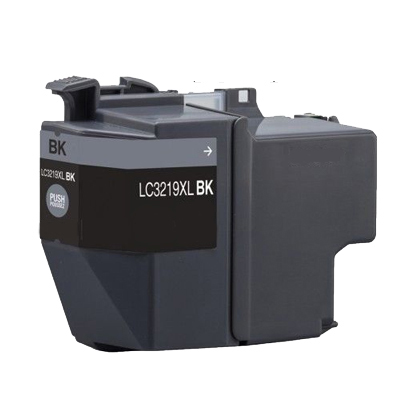
BROTHER MFC J6530DW Black ink Compatible 3219XL High Capacity Cartridge
Brother 3219XL Ink Cartridge Black with a print capacity of 3,000 Pages.
BROTHER MFC J6530DW Cyan ink Compatible 3219XL High Capacity Cartridge
Brother 3219XL Ink Cartridge Cyan with a print capacity of 1,500 Pages.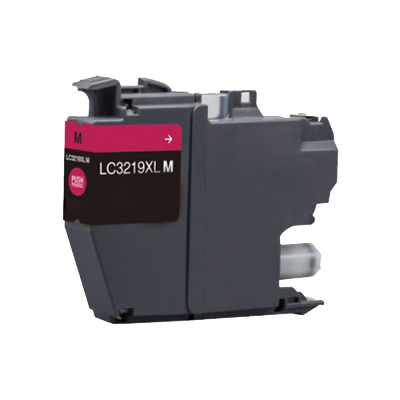
BROTHER MFC J6530DW Magenta ink Compatible 3219XL High Capacity Cartridge
Brother 3219XL Ink Cartridge Magenta with a print capacity of 1,500 Pages.
BROTHER MFC J6530DW Yellow ink Compatible 3219XL High Capacity Cartridge
Brother 3219XL Ink Cartridge Yellow with a print capacity of 1,500 Pages. Conclusion
 Conclusion
Brother MFC-J6530 DW should be a good choice for businesses and home offices that seek A3 design devices that can print, copy, scan and fax. Although the output in terms of graphics and is not good it can do fairly well in printing clear texts. The all-in-one is an affordable and reliable option for small to medium volume business requirements with its widespread applications.
How to fix the print quality issue of white lines in the text or graphics in the Brother MFC-J5335DW printer?
Perform the following steps to fix the print quality issue of white lines in the printout:
Step 1: Make sure that the Brother MFC-J6530DW ink cartridges are installed properly and there is no foreign particle present between the printhead nozzle.
Step 2: Clean the printhead.
- Access the printer driver window.
- For Window 7 User: From start menu click, control panel and then select devices and printer. Right click on your printer and open printer driver window.
- For Window 10 User: Click window tab and then click all apps. In the window system open control panel.
- Click maintenance tab.
- Select print quality, if you want to check the quality of the print.
- Else, click print head cleaning. You can select the black, colour or all option according to your print quality. And then click next.
- Select the strength according to the quality of the print.
- Then click start.
Step 3: Check for the ink level of Brother MFC-J6530DW ink cartridges. Replace the ink cartridge if the ink level is low.
Step 4: Check the Print Alignment
- Access the printer driver window. Jump to step 2 to know about the process to access printer driver window.
- Click the General tab and click printing preferences. The printer driver dialogue box will pop-up.
- Click on to the advanced tab.
- And further click print options.
- Select the option- “Reduced Uneven Lines”.
- According to your printing preference, select the type and press ok.
Step 5: Check for the presence of foreign particles such as dust, debris etc. near Brother MFC-J6530DW ink cartridges area. This can also affect the print quality.
Step 6: If the issue is not resolved, then call for the support team.
You can also perform these steps if you get blurred or faded printouts.